Table of Contents
Mixes
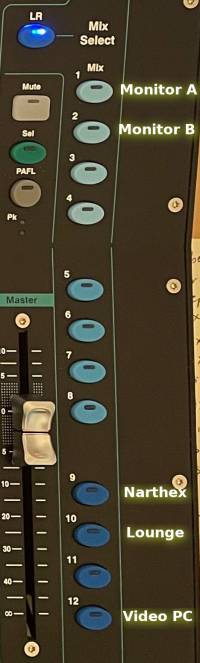 There are 13 mix buttons on the far right side of the soundboard: LR and Mix 1 thru Mix 12. These are the outputs of the soundboard. LR is the main Left-Right mix going to the sanctuary speakers. Mixes 1 thru 12 each send our sounds to the choir monitors, the ceiling speakers in the narthex, to the lounge and nursery, and to the PC that streams our service to YouTube. You can see some of these mixes labeled on the image to the right.
Mixes are completely separate from one another. Adjusting faders only affects the currently selected mix. When you touch another Mix button the faders will jump to new positions showing the channel volumes in the new mix.
Most of these mixes do not need to be adjusted by hand but here are some differences you may notice if you flip through them:
- The house mix for the sanctuary (LR Mix) has the Hanging mics at negative infinity. The organ is LOUD on its own so we don't need to send it thru the sanctuary speakers too.
- All other mixes do include organ music using the Hanging mics, otherwise people listening to the mix would never hear the organ because they're not in the sanctuary.
- This is also true of the audience mics in the LR Mix. The congregation in the sanctuary doesn't need to hear themselves singing thru the speakers so we leave the audience mics faded to -~~.
- Likewise the audience mics are turned up in all other mixes so that people listening in the lounge or on YouTube can hear the responsive readings and hymns being sung.
While sitting at the soundboard your ears can hear the sound in the sanctuary. But you need to keep the needs of the other mixes in mind. Remember to unmute the hanging mics during organ music and the audience mics during congregational responses and hymn. That doesn't add anything to the sanctuary sound but it does allow people in other locations to hear what's happening in the sanctuary.
The LR Mix and Mix 12
The two most important mixes are LR and Mix 12. LR is the house mix – what you hear from the sanctuary speakers. Mix 12 goes to the video desk and is ultimately streamed to YouTube and recorded to DVD.
A notable feature of the LR mix is that hanging and auditorium mics are faded to -~~ to prevent the organ and the congregation from coming through the main speakers.
Likewise Mix 12 must include the hanging and auditorium mics at a fader level that allows them to be heard in the mix.
Mix 1 -- Monitor A
This mix is sent to the wedge monitors on the chancel platform. The choir uses these wedges to hear their music when the perform from the chancel steps.
Usually all channels are muted in Mix 1 except the choir's accompaniment music. The piano mic and CD input remain unmuted so the choir can hear them.
Mix 2 -- Monitor B
All patch panels have an output for Mon B too. Currently we don't use it for anything because no one needs a separate monitor mix. If we ever get a drum set though, maybe we can send the drummer his own custom mix on Monitor B.
Mixes 3 thru 8
These mixes are sent to the patch panels.
| Soundboard Mix | Panel location | Panel label |
|---|---|---|
| 3 | Left panel | Mix 1 |
| 4 | Left panel | Mix 2 |
| 5 | Right panel | Mix 3 |
| 6 | Right panel | Mix 4 |
| 7 | Organ panel | Mix 5 |
| 8 | Organ panel | Mix 6 |
Mixes 9 and 10
These mixes go to other locations in the church so that people in the building can hear what's happening in the sanctuary. These mixes are preset and it is not necessary to adjust them.
Mix 9 goes to the speakers in the Narthex ceiling.
Mix 10 goes to the Lounge, Office, Nursery, and Library.
Mix 11
Mix 11 is unused at the time of this writing. If you have a great idea for it, speak up!
Mix 12 -- Output to the Video Desk
Mix 12 goes to the PC on the video desk and is used to make recording and live stream to YouTube.
You must pay careful attention to the fact that people may be participating in the worship service by watching online. You must unmute the hanging mics so that they can hear the organ and unmute the auditorium mics so they can hear the congregation.