Table of Contents
Sound Board Operator's Quick Guide
Turn on the sound board. Depress the power button on the back panel, right side. This is the only push-button control back there so just try gently depressing any little nubs you feel and eventually you'll get it.
Enjoy the light show on the control surface as the board performs a 10-second start-up sequence.
Load the Sunday Scene. This puts the board in exactly the state we want for a Sunday worship service.
- Press the “Scenes” button below the LCD.
- Press scene 1 – named “Sunday” – on the screen.
- Press “Go” to recall that scene and the board will be ready for a Sunday service.
EMERGENCY LANDING VERSION
This section is for EMERGENCY LANDINGS. It will enable a worship service to happen even if you're no pilot.
Just four mics truly matter for audio in the sanctuary: the Pulpit, Lectern, Piano, and “CD In”. These four mics will enable the people in the pews to hear the liturgy, the sermon, and the music during songs. They probably won't even notice that anything is different.
These mics are controlled by the first four channel strips on the left. You should mute and unmute each when someone is using it.
In this only-the-basics scenario the pastor will need to preach from the fixed pulpit mic instead of a wireless headset.
Thank you for stepping in as the emergency sound board operator. When the emergency is over and you have more time please read on to familiarize yourself with regular, non-emergency sound board operations.
<pagebreak>
How a Channel Strip Works
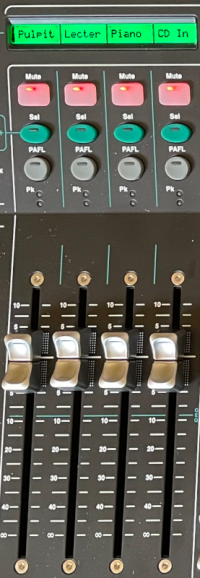
A channel strip controls the input from one device somewhere in the sanctuary. That device is probably a microphone but could be a CD player or even the pastor's iPad.
A label at the top of each channel strip tells you what it controls. Some of the labels make sense just to read them, like “Pulpit”. Others will require a little more decoding, like “W3Lav”.
Below the label is the Mute button. This button will instantly stop input from this channel. I.e., the mute button stops any sounds made into the microphone from going to our loudspeakers. Most channels remain muted most of the time.
The next two buttons are Select and PAFL. Super useful buttons but not part of this overview.
Finally we have the fader. It will change the volume of the channel. 0 dB means no change to the volume. If you need to turn up then slide the fader toward the top of its range. This will provide up to a 10 dB increase, which is much louder. If you need to turn down then slide the fader toward the bottom of its range. Going completely to the bottom (-~~) will make it inaudible.
<pagebreak>
All the Channels, Explained
Essential Mics

About these channels
- They are called essential because they are the four mics that truly matter.
- They are muted. We do not want to hear them in the LR Mix or any other mix until their part of the service.
- Piano is a microphone aimed at the depths of the piano.
- CD In is Terry's CD player that he uses from the front of the church.
Working these channels
| Channel | Starts | How to operate |
|---|---|---|
| Pulpit | Muted, 0dB | Unmute this channel when someone is speaking from the pulpit. |
| Lectern | Muted, 0dB | Unmute this channel when someone is speaking from the lectern. |
| Piano | Muted, 0dB | Unmute this channel when someone is playing the piano. |
| CD In | Muted, 0dB | Unmute this channel when Terry is playing music for the choir from his CD player. |
<pagebreak>
Wireless Mics

About these channels
These are the four wireless microphones.
- W1Emma is always used by Pastor Emma. She keeps it in her office.
- W2Sara is always used by Sara Clauss. She keeps it in her office.
- W3Lav is a lavalier mic that clips to someone's shirt. It's in the sound cabinet drawer, inside a zipper pouch.
- W4Hand is a handheld microphone. It's in the sound cabinet drawer, rolling around.
- Keep the fader low until the user is done turning on the mic and getting it in place or else we're going to amplify a lot of noisy, scratchy garbage.
- Different users have different mic techniques. You don't know if the first word out of their mouth will be quiet or booming. People flinch when it's too loud, so err on the side of too soft and then turn it up.
Working these channels
| Channel | Starts | How to operate |
|---|---|---|
| W1Emma | Muted, -~~ | Unmute and raise the fader to get a good audio level once Emma is speaking. |
| W2Sara | Muted, -~~ | Unmute and raise the fader to get a good audio level once Sara is speaking. |
| W3Lav | Muted, -~~ | Unmute and raise the fader to get a good audio level once someone is speaking. |
| W4Hand | Muted, -~~ | Unmute and raise the fader to get a good audio level once someone is speaking. |
<pagebreak>
Choir and Hanging Mics

About these channels
Terry will move ChoirL and ChoirR into place just before the choir sings.
HangL and HangR are tiny mics dangling in front of the chancel steps about 4 meters off the ground. They are used primarily so people outside the sanctuary can hear what's going on. They pick up room-filling sounds like the organ playing or the choir singing: if a sound is easy to hear in the sanctuary then they'll pick it up.
- All four of these mics are prone to feedback if turned up too high. Keep your ears open.
- Be ready to make adjustments as the choir sings softer or louder depending on the song.
- The hanging mics are unmuted any time the organ is playing or there are other room acoustics. We must unmute them when the organ is playing for the sake of Mix 10 and Mix 12 though we will keep them low in the LR Mix because the organ doesn't need extra amplification in the sanctuary.
Working these channels
| Channel | Starts | How to operate |
|---|---|---|
| ChoirL | Muted, 0dB | Unmute the choir mics only after Terry is done placing and adjusting them. |
| ChoirR | Muted, 0dB | Unmute choir mics only after Terry is done placing and adjusting them. |
| HangL | Muted, -~~ | Unmute any time the organ is playing or there are other room acoustics. |
| HangR | Muted, -~~ | Unmute any time the organ is playing or there are other room acoustics. |
<pagebreak>
Auditorium Mics

About these channels
Aud1 thru Aud4 are mics mounted on the side walls and aimed at the pews. We use them to capture the sound of the congregation during responsive readings and hymns. Aud1 is on the front left wall, Aud2 is front right, Aud3 is rear left, Aud4 is rear right.
- These mics start muted. They should be unmuted any time the congregation is supposed to be making noise, like during hymns and responsive readings
- We leave these channels faded down in the LR Mix because we don't want noise from the pews coming through the house loudspeakers.
- These mics are turned up in Mix 10 and Mix 12 where they provide an integral community aspect of the remote worship experience.
Working these channels
| Channel | Starts | Operating this channel |
|---|---|---|
| Aud1 | Muted, -~~ | Unmute during congregational participation so that Mix 10 and Mix 12 can hear it. |
| Aud2 | Muted, -~~ | Unmute during congregational participation so that Mix 10 and Mix 12 can hear it. |
| Aud3 | Muted, -~~ | Unmute during congregational participation so that Mix 10 and Mix 12 can hear it. |
| Aud4 | Muted, -~~ | Unmute during congregational participation so that Mix 10 and Mix 12 can hear it. |
<pagebreak>
Output Channels

The last four channels (colored in blue and yellow) are output channels. They control the level of an entire mix leaving the sound board. They change the volume not of an individual microphone but of all the channels in the mix at the same time.
About these channels
- RstChr is the mix that goes to the rest of the church. That's the lounge, library, nursery, and main office.
- Mon A is the mix that goes to the wedge monitors in the chancel. It carries music from the piano and/or Terry's CD player so the choir can hear it extra well.
- PC is the mix that goes to the PC for recording video and streaming to YouTube.
- MainLR is the LR mix. It controls the volume of the main house loudspeakers.
Working these channels
| Channel | Starts | How to operate |
|---|---|---|
| RstChr | Unmuted, 0dB | This channel should be fine; leave it alone. It would only be muted for anything we didn't want to send to the other rooms in the building, such as choir practice, a congregational meeting, or a preschool pageant. |
| Mon A | Unmuted, 0dB | This channel should be fine without adjustments. Terry will use hand gestures to communicate that he wants it faded up or down otherwise. |
| PC | Unmuted, 0dB | This channel should be fine without adjustments. You can fade it up or down if the PC operator asks for more or less volume. |
| MainLR | Unmuted, 0dB | This is what you hear from the house speakers. Use your ears to adjust it. Normally around 0 dB or just a little louder does the job. |